Substack Link in Bio: How to Add Links to Your Profile and Social Bios
A Substack link in bio can mean two things: adding an external link to your Substack profile or publication, or adding your Substack newsletter to your Instagram, TikTok, X, or another social bio. On Substack, personal profile information is managed through Edit profile, while publication homepage links are managed separately through the publication’s own settings. If your goal is to grow subscribers from social media, you can link directly to your Substack publication or use a link-in-bio page when you need to promote several destinations.
Interface checked September 7, 2026
What is the best link to put in your bio for Substack?
If Substack subscriptions are your only goal, link directly to your Substack publication or subscribe page. If you also promote a podcast, store, courses, social profiles, sponsors, booking links, or other destinations, a link-in-bio page lets you organize them behind one URL.
What is a Substack link in bio?
The phrase covers two different jobs. The first is outbound: putting a link on Substack so readers who find your profile or publication can reach something else you run. The second is inbound: putting your Substack URL into an Instagram, TikTok, X, YouTube, Threads, or LinkedIn bio so social followers can subscribe.
Substack also keeps your personal profile and your publication apart. Your profile is you as a writer and reader — it can carry a Website link and a set of social handles. A publication is the newsletter itself, with its own name, homepage, subscribe page, and settings. Most confusion about a Substack link in bio comes from mixing those two up.
One disambiguation: "Link in Bio" is also the name of Rachel Karten’s social media newsletter, which is published on Substack. If you were searching for that newsletter rather than for instructions, it is a separate publication and not related to this guide.
How to add a link to your Substack profile
- Sign in to Substack. Open substack.com and sign in with the account that owns the profile you want to edit.
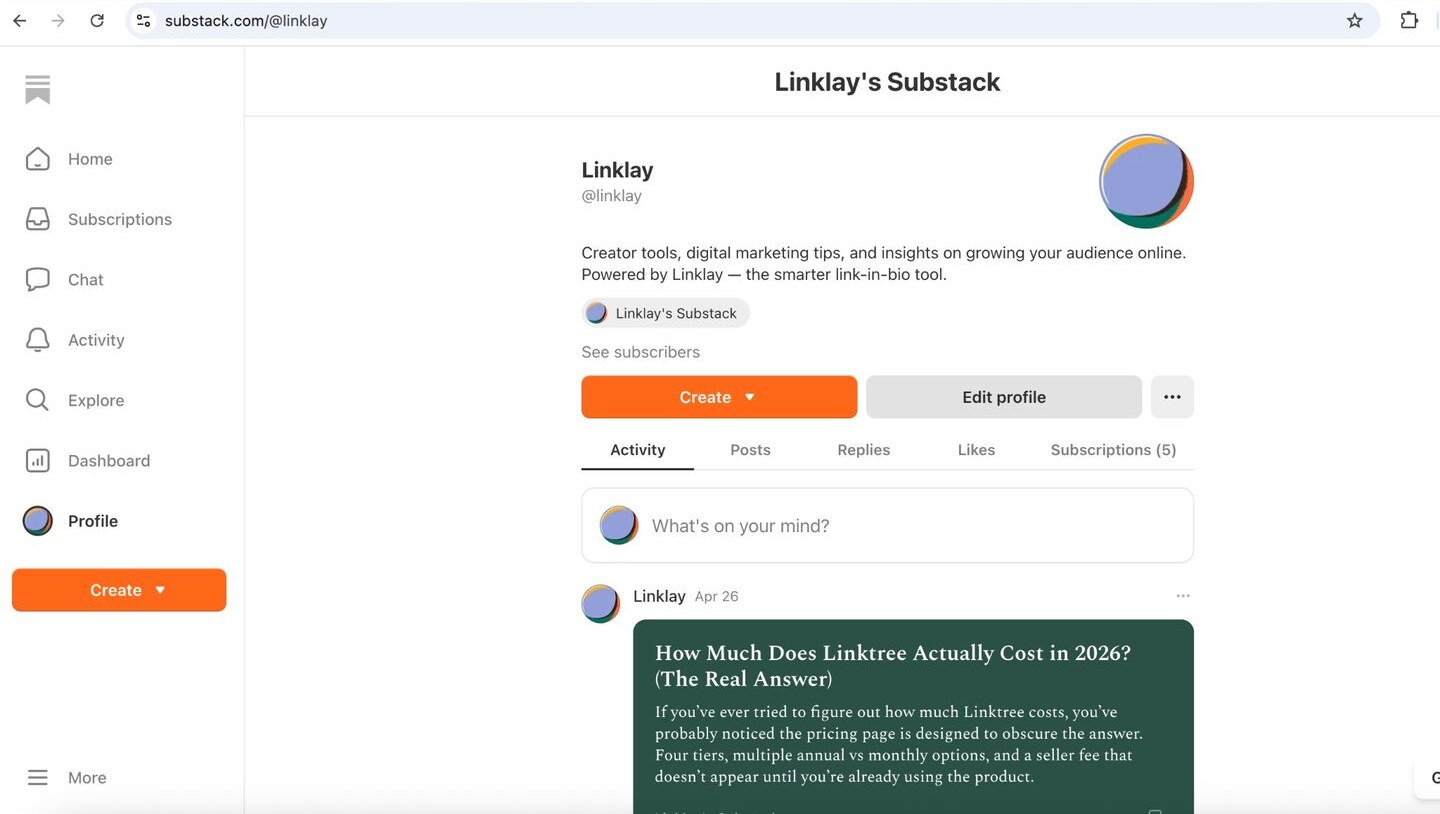
- Open your Profile. Click Profile in the left sidebar to open your public creator profile.
- Select Edit profile. Click the Edit profile button next to Create on your profile header.
- Scroll to the Website field. The editor lists your name, bio, and a stack of social and creator fields — Bluesky, Soundcloud, Bandcamp, Books — with Website below them.
- Enter the external URL. Paste the URL you want shown on your Substack profile. This can be your own site, or a link-in-bio page if you want one slot to open several destinations.
- Save and check the public profile. Save your changes, then open your public profile at substack.com/@yourhandle and confirm the link renders and opens the right destination.
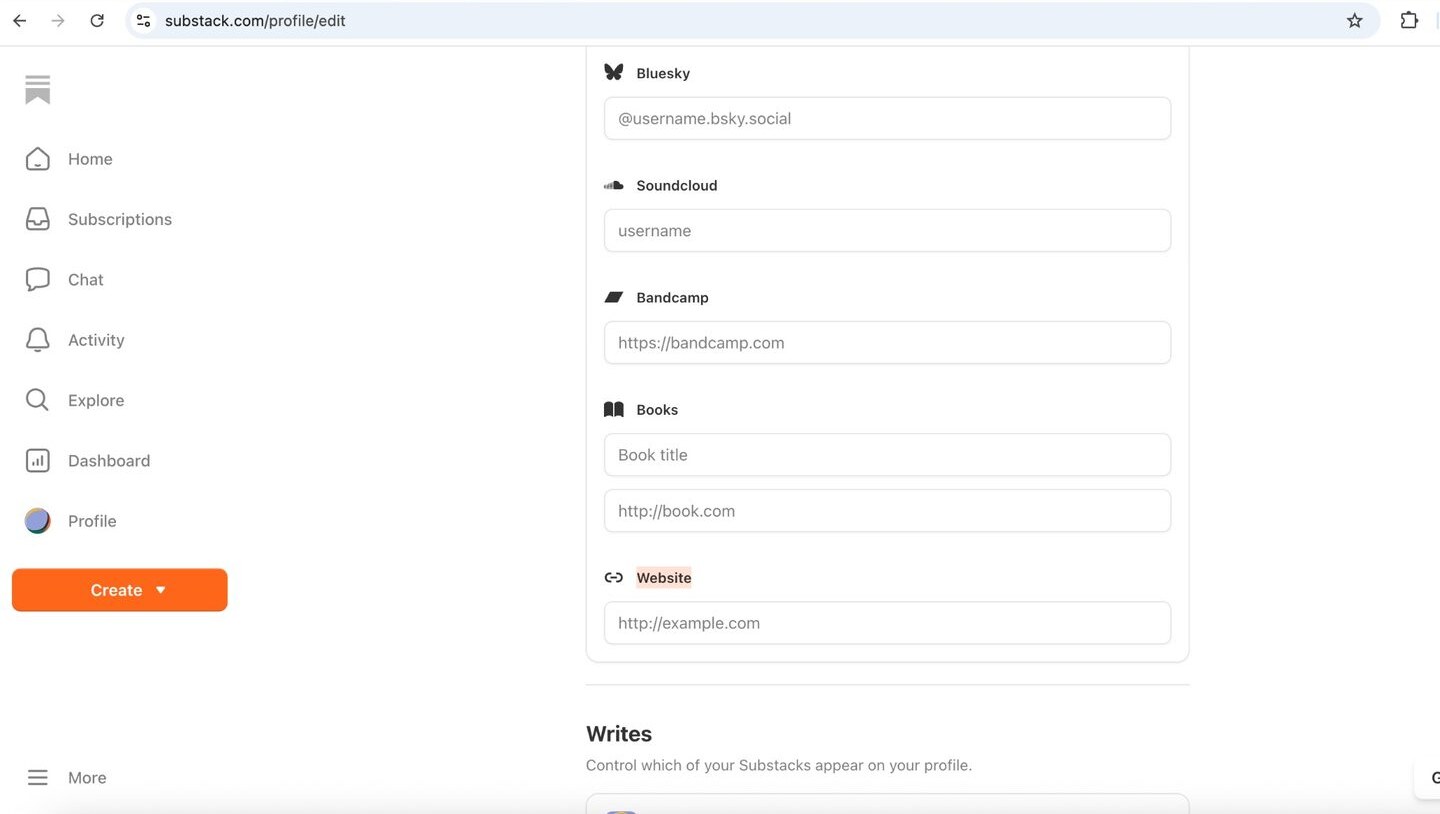
Interface checked September 7, 2026. Substack updates its editor from time to time, so field order and menu labels can move.
How to add links to your Substack publication homepage
A publication is managed separately from your profile. Open the publication dashboard, then its Settings, where you will find the publication’s name, description, homepage layout, custom domain, and the social and website details that appear on the publication page. Changes here affect what readers see on the newsletter homepage — not the Website field on your personal profile.
If you write for more than one publication, each one carries its own settings and its own homepage, while your personal profile lists the publications you write for. That is why a single Substack account can show a creator profile and a newsletter side by side.
Account and publication settings are reached from the More menu at the bottom of the Substack sidebar. Use that route for publication-level options; the personal Website field stays inside Edit profile.
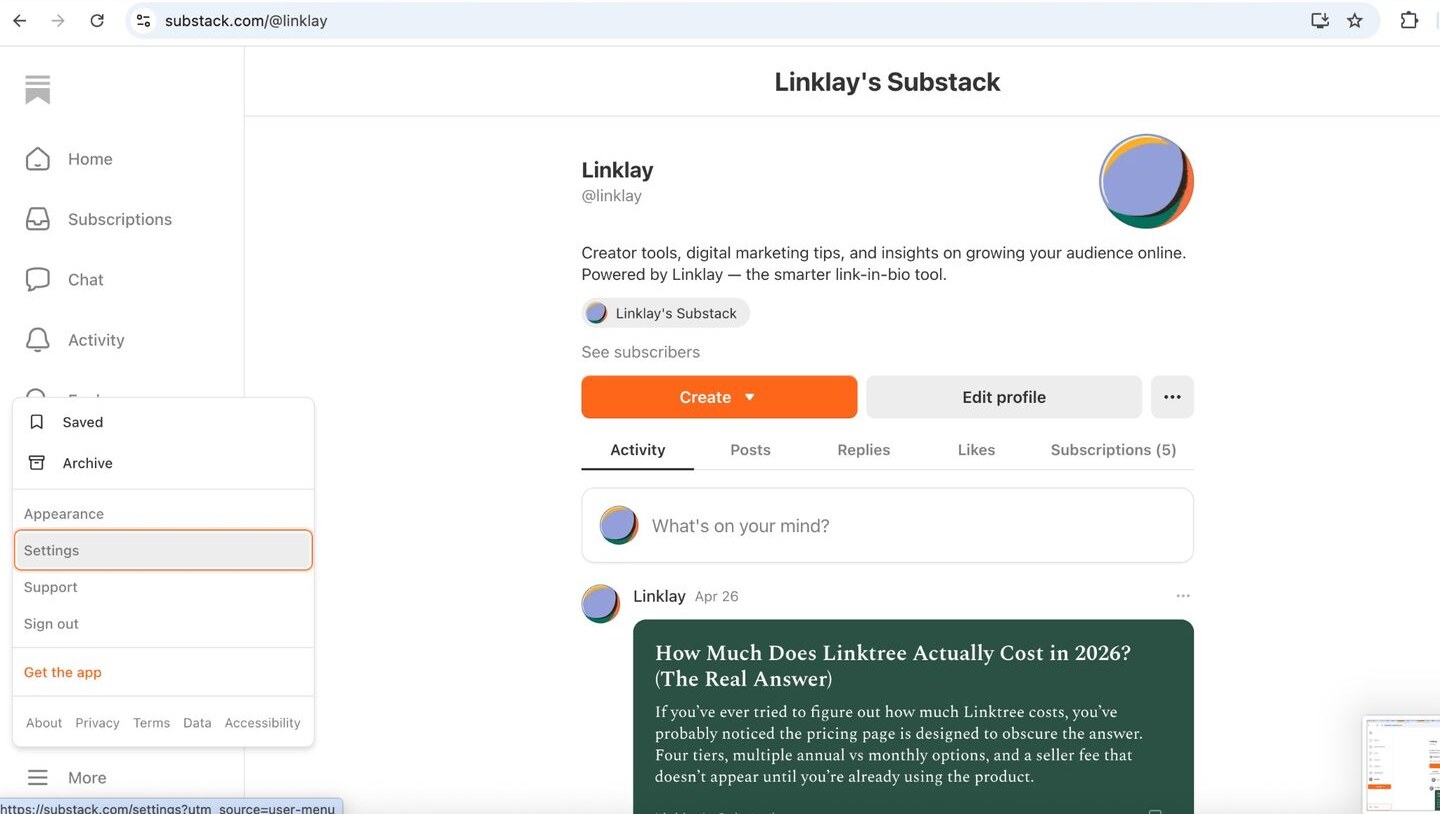
For the exact current wording of each setting, check the official Substack Help Center rather than older third-party tutorials — publication settings are the part of Substack that changes most often.
How to put your Substack in your Instagram bio
- Copy your Substack URL. Open your publication homepage and copy the address from the browser, or copy your custom domain if you use one.
- Open Edit profile on Instagram. Go to your Instagram profile and tap Edit profile.
- Add it in the Links area. Open Links, add the URL, and give it a clear label such as "Read the newsletter" so followers know where the tap goes.
- Decide between direct and multi-link. Link straight to Substack if subscriptions are the only goal. If you also send people to a podcast, shop, or booking page, point the slot at a link-in-bio page instead.
Instagram supports several links in the Links area, and each one can carry its own label. Step-by-step detail lives in the Instagram bio link guide.
How to put your Substack in your TikTok bio
Copy your Substack publication URL, open TikTok, tap Edit profile, and paste it into the website field if your account has one. Not every TikTok account shows a clickable website field — availability can depend on account type, region, and TikTok’s current rules, so check your own Edit profile screen before planning around it.
If the field is unavailable, creators normally put the URL in the bio text and repeat it verbally or on screen in videos. The current requirements are covered in the TikTok bio link guide.
How to put your Substack in X, YouTube, Threads, and LinkedIn
The strategy is the same everywhere: one destination per available slot, labelled clearly, pointing either straight at Substack or at a page that fans out to everything you run.
- X: one Website field in profile settings. Use the subscribe destination if signups are the goal.
- YouTube: channel links appear on your channel page and can be repeated in video descriptions, where most clicks actually happen.
- Threads: a link field on the profile, edited in the same place as your bio text.
- LinkedIn: websites live in the Contact info section of your profile, and can also sit in a featured post.
Platform-by-platform instructions are collected in the social media guides hub.
Which Substack URL should you put in your bio?
| URL type | Best use |
|---|---|
| Publication homepage | General newsletter promotion, where readers can browse posts before subscribing |
| Subscribe-focused destination | Maximizing newsletter signups from a campaign or a single social slot |
| Individual post | Promoting one article, essay, or launch while it is timely |
| Personal Substack profile | Promoting the writer across several publications, or when you also want your reading activity visible |
| Custom domain | A branded publication experience when you already own the domain |
A homepage link gives new readers context and is the safest default. A subscribe-focused destination removes a step when a campaign has one job. Post links work well while an article is fresh but go stale in a bio, so swap them back afterwards. Do not assume a fixed URL pattern for subscribe pages — copy the destination Substack actually gives you.
Should you link directly to Substack or use a link-in-bio page?
| Goal | Best option |
|---|---|
| Only grow Substack subscribers | Direct Substack publication or subscribe URL |
| Promote newsletter + podcast + store | Link-in-bio page |
| Promote several social accounts | Link-in-bio page |
| Promote one specific new article | Direct article link, temporarily |
| Measure traffic from multiple campaigns | Trackable URLs or link-in-bio analytics |
| Build an audience around several offers | Link-in-bio page |
Use a direct Substack link when the newsletter is the only conversion goal — every extra click costs subscribers. Use a link-in-bio page when you need to route visitors to several destinations, or when you want click data before the visitor leaves for Substack.
Using Linklay for a Substack link in bio
Linklay can be useful for Substack writers who want one bio URL for their newsletter, latest posts, podcast, store, booking page, social profiles, and other destinations. Linklay also provides analytics and supports retargeting pixels, which can help writers understand how visitors interact with the page before clicking through to Substack.
A Linklay page links out to Substack rather than replacing it. Subscriptions, posts, payments, and reader email all stay inside Substack; Linklay is the page in front of it. Linklay does not process creator payments or take a cut of creator sales. Creators link out to external storefronts, payment platforms, memberships, affiliate offers, booking pages, and other destinations.
A free page covers most newsletter writers; the paid plan is listed on the pricing page, and the wider category is compared on the link in bio hub.
How to track Substack traffic from your bio
Add UTM parameters to the Substack URL you place in each bio, so the traffic arriving at Substack is labelled by source instead of landing in one undifferentiated bucket.
Example: ?utm_source=instagram&utm_medium=social&utm_campaign=substack
- utm_source names where the visitor came from — instagram, tiktok, youtube.
- utm_medium names the type of traffic — social, email, referral.
- utm_campaign names the push the link belongs to — substack, spring-launch.
Give each platform its own campaign URL. Without that separation you cannot tell whether TikTok or your podcast is producing subscribers, and you end up guessing which channel deserves more work.
A link-in-bio page adds a second measurement point: clicks and referrers are recorded on the page itself, before the visitor leaves. Analytics on the Linklay page describe what happens on that page — what a visitor does after arriving at Substack is only visible inside Substack.
Substack link-in-bio examples
Four layouts that work for newsletter writers. Put the highest-priority call to action first — the top link takes the majority of clicks.
- Newsletter-only writer: Subscribe to my newsletter.
- Writer + podcast: Read the newsletter | Listen to the podcast | Latest episode | About me.
- Creator business: Join my Substack | Work with me | Shop | YouTube | Instagram.
- Author: Read my Substack | Buy my book | Upcoming events | Press | Contact.
More layouts across other niches are collected in the link in bio examples roundup.
Frequently asked questions
What link should I put in my bio for Substack?
Link directly to your Substack publication or subscribe destination when newsletter signups are your only goal. If you also promote a podcast, shop, courses, or several social accounts, use a link-in-bio page so one URL opens all of them.
How do I add my Substack to my Instagram bio?
Copy your Substack publication URL, tap Edit profile on Instagram, open the Links area, paste the URL, and label it clearly. Instagram supports several labelled links, so you can keep the newsletter separate from other destinations.
How do I add my Substack to my TikTok bio?
Copy your Substack URL, tap Edit profile in TikTok, and paste it into the website field if your account shows one. Availability can vary by account type and region, so check your own Edit profile screen; otherwise put the URL in the bio text.
Where do I find my Substack URL?
Open your publication homepage while signed in and copy the address from the browser bar. Your personal profile has its own address at substack.com/@yourhandle, and a custom domain replaces the default publication address if you have set one up.
Can I put multiple links on my Substack profile?
The profile editor offers one Website field plus a set of dedicated social and creator fields such as Bluesky, Soundcloud, Bandcamp, and Books. To share more destinations than that, point the Website field at a page that lists them all.
Can I add external links to Substack?
Yes. You can add an external URL to your profile’s Website field, link out from inside posts, and set website and social details on the publication. External links are allowed — Substack simply gives you a limited number of fixed slots.
Should I link to my Substack homepage or subscribe page?
Use the homepage when readers benefit from browsing a few posts first, which suits general bio placement. Use a subscribe-focused destination when a campaign has one job and you want to remove a step.
Can I track Substack subscribers from Instagram?
Add UTM parameters such as ?utm_source=instagram&utm_medium=social&utm_campaign=substack to the URL you place in your Instagram bio, so the visit is labelled by source. A link-in-bio page also records the click before the visitor reaches Substack.
What is the best link in bio for Substack writers?
There is no single answer: writers who only sell subscriptions do best with a direct Substack link, while writers with a podcast, shop, or several offers need a multi-destination page. Choose on how many destinations you actually promote.
Can I use a custom domain with Substack?
Yes, Substack supports connecting a custom domain to a publication, configured in the publication settings. Once it is live, use the custom domain in bios so the branded address is what readers see and share.
Sources
Interface checked September 7, 2026.
Build one bio link for your newsletter and everything around it
Add your Substack, latest posts, social profiles, podcast, store, booking links, and other destinations to one Linklay page.