How to Add a Link on Snapchat in 2026
Snapchat has no single "bio link" field the way Instagram or TikTok do. Three different things get called a Snapchat link: attaching a URL to an individual Snap with the paperclip icon, adding a persistent Website link to a Public Profile, and sharing your own profile URL so people can add you. This guide explains each one, who actually has access to it, and what to do when the Website field is simply not there.
Last verified September 8, 2026 against Snapchat Support, the Snapchat Creator Help Center and the Snapchat Business Help Center
How do you add a link on Snapchat?
To attach a link to a single Snap, take the Snap, tap the paperclip icon on the Preview screen, paste or type the URL, then tap "Attach to Snap" — viewers swipe up to open it. A persistent link is different: it lives in the Website field of a Public Profile, and that field is part of the Creator Account and Business Profile feature set rather than every standard Public Profile. If your Edit Profile screen only shows Bio, Location and background options, your profile does not currently include a Website field.
Key takeaways
- Per-Snap link: Preview screen → paperclip icon → paste the URL → Attach to Snap. Anyone can do this; the link lasts as long as the Snap does.
- Persistent link: the Website field on a Public Profile. Snapchat documents it with Creator Accounts and Business Profiles, not with every standard Public Profile — so plenty of people genuinely do not have it.
- Your own profile URL is always snapchat.com/add/USERNAME, which is also how Snapchat says to retrieve your Snapcode.
- Because a Snap link is a single URL, creators paste one link-in-bio page such as linklay.io/yourname and change the destinations on the page instead of re-editing every Snap.
The three kinds of Snapchat link
Most confusion about Snapchat links comes from three separate features sharing one search phrase. They behave differently, they are available to different accounts, and only one of them is persistent.
| What you want | Where it lives | Who can use it | How long it lasts |
|---|---|---|---|
| Send people to a website from a post | Paperclip attachment on the Snap Preview screen | Any Snapchat account | As long as the Snap or Story does |
| A permanent link on your profile | Website field in Public Profile details | Profiles that include the Website field (documented with Creator Accounts and Business Profiles) | Until you change it |
| Let people find and add you | snapchat.com/add/USERNAME | Any Snapchat account | Permanent |
Attach a link to a Snap (anyone can do this)
- Take or select the Snap you want to send. Open the Snapchat camera and capture a photo or video, or pick one from Memories. You do not need a Public Profile, a Creator Account or a follower minimum to attach a link to a Snap.
- Tap the paperclip icon on the Preview screen. After capture you land on the Preview screen with the editing tools stacked down the right-hand side. Tap the paperclip icon. Snapchat documents this as the way to attach a web link to a Snap.
- Paste, type or search for the URL. Snapchat lets you paste a URL you have copied, type one in, or search for one. Include the full address with https://. If you want more than one destination behind the Snap, paste a link-in-bio page such as linklay.io/yourname instead of a single product URL.
- Tap "Attach to Snap". Snapchat shows a preview of the page it will attach. Tap "Attach to Snap" to confirm. The link is now bound to that Snap.
- Send the Snap or add it to your Story. Send it to friends or post it. When someone views the Snap they can swipe up to open the website you attached. The link disappears with the Snap — this is not a permanent profile link.
The Website field on a Public Profile
A Public Profile is the public-facing side of your account: a photo, bio, description, location, your public Stories, Lenses and Spotlight posts. Snapchat says Snapchatters aged 16+ have a Public Profile by default and can decide whether they use it.
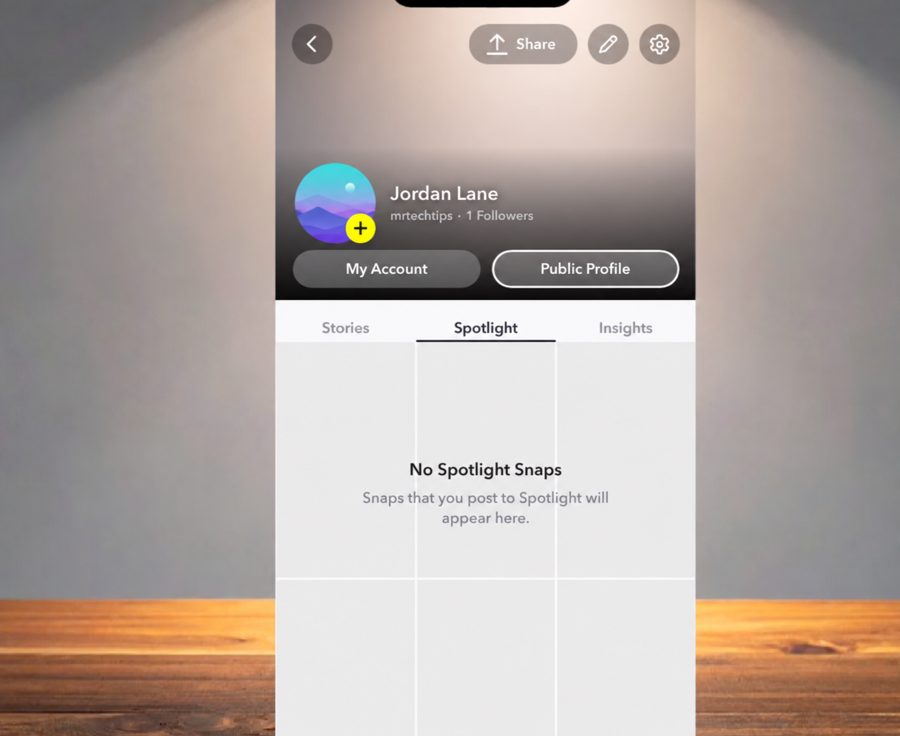
To open and edit it: tap your Bitmoji or profile icon in the top-left of the camera screen to open your profile, tap Public Profile, then tap the pencil icon to edit your profile details. That is where the bio, description, location and — when your profile includes it — the Website field live.
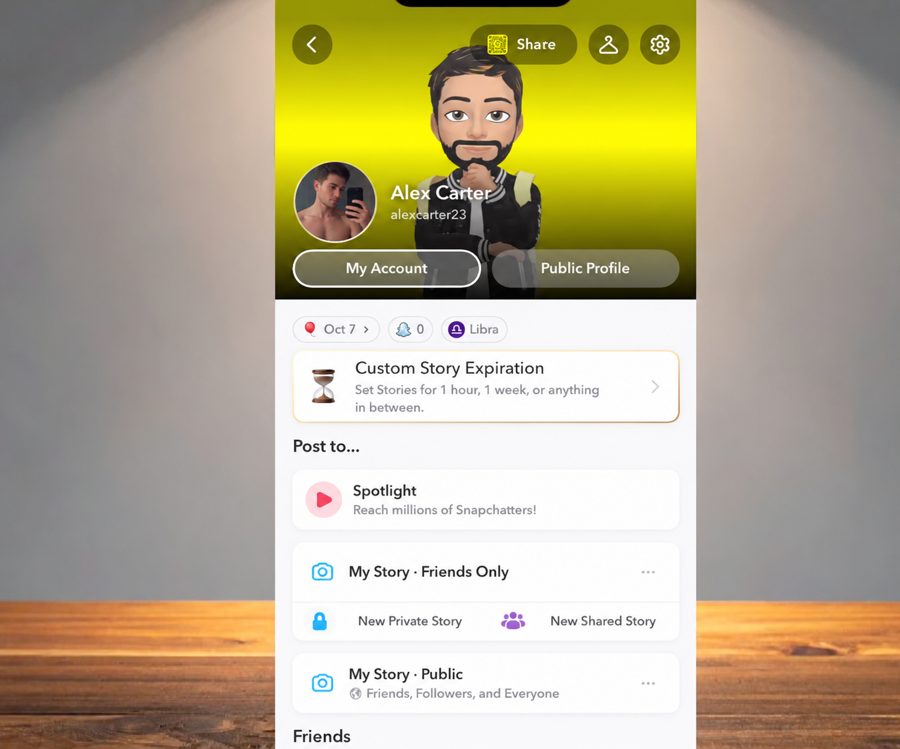
- Open Snapchat and tap your Bitmoji or profile icon.
- Tap Public Profile.
- Tap the pencil icon to edit your profile details.
- If a Website row is present, tap it, paste your full URL including https://, and save.
One field means one destination. Creators who promote a store, a booking page, a newsletter and a latest video usually put a link-in-bio page in that single field so the profile link never has to change again.
Why you may not see a Website field
This is the single most common Snapchat link problem, and in most cases nothing is broken. Snapchat splits Public Profile features by profile type: its support documentation lists the fuller feature set — including the website link — under Creator Accounts and Business Profiles with a Public Profile, and explicitly notes that a standard Public Profile does not include everything on that list.
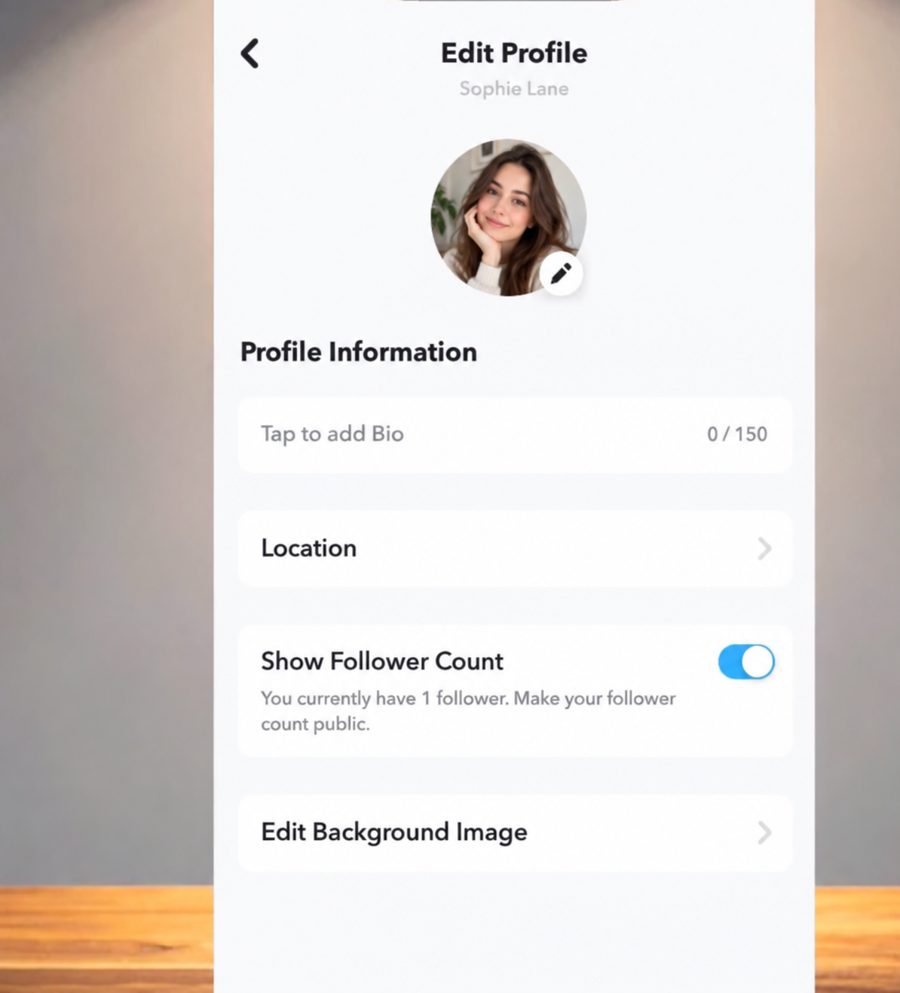
So if your Edit Profile screen shows Bio, Location, Show Follower Count and Edit Background Image and no Website row, your account is on a standard Public Profile. Reinstalling the app, clearing the cache or waiting will not add the row.
- Age: Public Profiles are for Snapchatters 16+, and some profile features are gated by age.
- Region: profile and monetisation features roll out on different schedules in different countries.
- Account standing: accounts with restrictions can lose access to public features.
- Profile type: the biggest factor — a standard Public Profile is not the same as a Creator Account or a Business Profile.
Standard, Creator, Business: what each one gets
| Profile type | How you get it | What Snapchat documents |
|---|---|---|
| Standard Public Profile | Available by default to Snapchatters 16+ who opt in | Photo, bio, description, location, public Stories, Lenses and Spotlight. Snapchat notes a standard Public Profile does not include every feature on the Creator list. |
| Creator Account | Snapchat-managed eligibility; managed with the Creator tools | The fuller Public Profile feature set, including subscriber count and the website link, plus creator insights. |
| Business Profile | Set up in Snapchat Ads Manager, not in the mobile app | Public Profile for a business, managed both in-app and on the web through Ads Manager; content posting still happens in-app. |
| Professional account tooling | Depends on account and region | Snapchat groups Creator and Business profiles as professional profiles; availability of individual features varies. |
The practical read: if you need a link on Snapchat today and you are on a standard Public Profile, use the paperclip attachment on Snaps and your profile URL for discovery. Treat the Website field as a bonus that arrives with a Creator Account or a Business Profile, not as something you can force.
Sharing your Snapchat profile URL and Snapcode
Every account has a web address in the form snapchat.com/add/USERNAME. Snapchat documents this same address as the way to retrieve your Snapcode. Put it on your website, in your other bios, or as a link on your Linklay page so people can add you in one tap.
- Profile URL: https://www.snapchat.com/add/yourusername
- Snapcode image: retrieved through the same snapchat.com/add/USERNAME address
- Snapchat also publishes guidance for developers on linking to a public Snapchat profile from your own site
Story links and Spotlight
A Story is made of Snaps, so the same paperclip attachment applies before you post: attach the URL on the Preview screen, then add the Snap to your Story. Viewers swipe up to open it. The full walkthrough, including what viewers see, lives on the dedicated Story guide.
Spotlight is a separate surface with its own rules, and Snapchat does not document a general link attachment for Spotlight submissions the way it does for Snaps. Rather than promise something that may not appear on your account, check the Spotlight submission screen for a link option and fall back to your profile URL and Snap attachments if there is none.
Troubleshooting
- No paperclip icon on the Preview screen: make sure you are on the Preview screen after capture, not the camera screen, and update the app.
- The URL will not attach: use the complete address including https://, and avoid shortened or flagged domains — a link-in-bio page on a stable domain attaches more reliably.
- No Website row in Edit Profile: your profile type does not include it. See the section above; this is a feature difference, not a bug.
- The link opens in the in-app browser and looks broken: test your destination inside Snapchat, not just in Safari or Chrome. Heavy pages and pop-ups behave badly in in-app browsers.
- Your typed URL in the Bio is not tappable: the Bio field is plain text and will never be clickable.
- Your Public Profile is not visible at all: confirm you have opted in to a Public Profile and that your account meets the 16+ requirement.
Using one link across every Snap
Every Snapchat link surface accepts exactly one URL. Change the product you are promoting and you would otherwise have to re-attach a new link to every future Snap — and the Snaps already out there keep pointing at the old page.
A link-in-bio page solves that by putting the changeable part on a page you control. Create a free Linklay page at linklay.io/yourname, add your store, booking page, newsletter, latest video and socials, and attach that one URL to your Snaps and to the Website field if you have one. When something changes, you edit the page — no Snap needs to be touched. Linklay also records clicks per link, which Snapchat does not break out for outbound taps.
One link for every Snap
Create a free Linklay page, attach linklay.io/yourname to your Snaps, and change where it sends people without touching Snapchat again.
Frequently asked questions
Does Snapchat have a link in bio?
Not in the Instagram sense. The Bio field on a Public Profile is plain text and is never clickable. A persistent clickable link exists only where Snapchat provides a Website field in the Public Profile details, which its documentation covers with Creator Accounts and Business Profiles rather than every standard Public Profile.
How do I attach a link to a Snap?
Take the Snap, tap the paperclip icon on the Preview screen, paste or type the URL, then tap "Attach to Snap". Viewers swipe up on the Snap to open the site. This works on any Snapchat account.
Why is there no Website field on my Snapchat profile?
Because your account is on a standard Public Profile. Snapchat documents the fuller Public Profile feature set, including the website link, with Creator Accounts and Business Profiles, and states that a standard Public Profile does not include everything on that list. Age, region and account standing also affect which profile features appear.
How do I get a Creator Account or Business Profile on Snapchat?
Creator Account eligibility is determined by Snapchat and is not a public follower threshold you can look up. A Business Profile cannot be created in the mobile app at all — Snapchat states it is set up in Ads Manager, then managed both in-app and on the web.
What is my Snapchat profile URL?
It is https://www.snapchat.com/add/USERNAME, using your Snapchat username. Snapchat documents the same address as the way to retrieve your Snapcode, so you can share either the link or the code.
Can I put a link in a Snapchat Story?
Yes — a Story is made of Snaps, so attach the URL with the paperclip icon on the Preview screen before you post, and viewers swipe up to open it. The dedicated Story guide walks through it in full.
Can I add multiple links on Snapchat?
Not natively: each Snap attachment and the Website field each hold one URL. Point that single URL at a link-in-bio page and every destination sits behind it, so you can change what you promote without editing Snapchat again.
Does Snapchat show how many people tapped my link?
Snapchat reports Story and Spotlight metrics but does not break out outbound link taps per destination. A link-in-bio page records clicks per link on your side, which is usually how creators measure this.
Sources
- Snapchat Support – How do I attach a link to a Snap?
- Snapchat Support – What features come with a Public Profile on Snapchat?
- Snapchat Support – What features come with a Creator account on Snapchat?
- Snapchat Support – What is a Public Profile on Snapchat?
- Snapchat Creator Help Center – Set Up or Edit Your Public Profile Information
- Snapchat Business Help Center – Public Profile For Business FAQs
- Snapchat Support – How do I make a Snapcode to share my Public Profile?
- Snap for Developers – How to Link to Your Public Snapchat Profile
Last verified September 8, 2026 against Snapchat Support, the Snapchat Creator Help Center and the Snapchat Business Help Center.