How to Add a Link to Your Instagram Bio
Instagram bio links are added from the Instagram mobile app: open your profile, tap Edit profile, tap Links, then Add external link. Paste the URL, give it a short title, and tap Done. The link appears under your bio as soon as you save. This guide covers the exact current flow, what the desktop site can and cannot do, and how to fix the most common reasons a bio link does not show up.
Last verified September 8, 2026 against the Instagram app and instagram.com
How do I add a link to my Instagram bio?
In the Instagram app, go to your profile and tap Edit profile. Tap Links, then Add external link. Paste the URL, add an optional title, and tap Done, then Done again to save. The link becomes clickable under your bio immediately. Instagram lets you keep up to five links this way; links cannot be added or edited from instagram.com on desktop.
Key takeaways
- The path is Profile → Edit profile → Links → Add external link. Paste the URL, add a title, tap Done.
- You can save up to five external links on a profile. Adding and editing them is only available in the mobile app, not on instagram.com.
- If you want to send followers to more than five destinations, or track which link gets clicked, point one of the slots at a link-in-bio page such as linklay.io/yourname.
Step-by-step: add a link to your Instagram bio in the app
- Open your profile in the Instagram app. Open Instagram on iPhone or Android and tap your profile picture in the bottom-right corner. Bio links can only be added from the mobile app, so start here rather than on a computer.
- Tap Edit profile. Tap the Edit profile button under your bio. This opens the screen with your name, username, pronouns, bio and links.
- Tap Links. Tap the Links row. Instagram shows any links you already have and an option to add another one.
- Tap Add external link. Tap Add external link. You will see two fields: URL and Title.
- Paste your URL and add a short title. Paste the full address, including https://. The title is optional but recommended: it is the text followers see instead of a raw URL, so use something like "Shop", "Newsletter" or "All my links". If you are sending people to a Linklay page, paste linklay.io/yourname here.
- Tap Done, then Done again to save. Tap Done in the top-right of the link screen, then Done on the Edit profile screen. Go back to your profile: the link now appears under your bio and is clickable for anyone who visits.
What a bio link looks like on your profile
Once saved, the link sits directly under your bio text with a small link icon. If you added a title, visitors see the title; otherwise they see the domain. With more than one link saved, Instagram shows the first link followed by a "and N more" label that opens the full list.
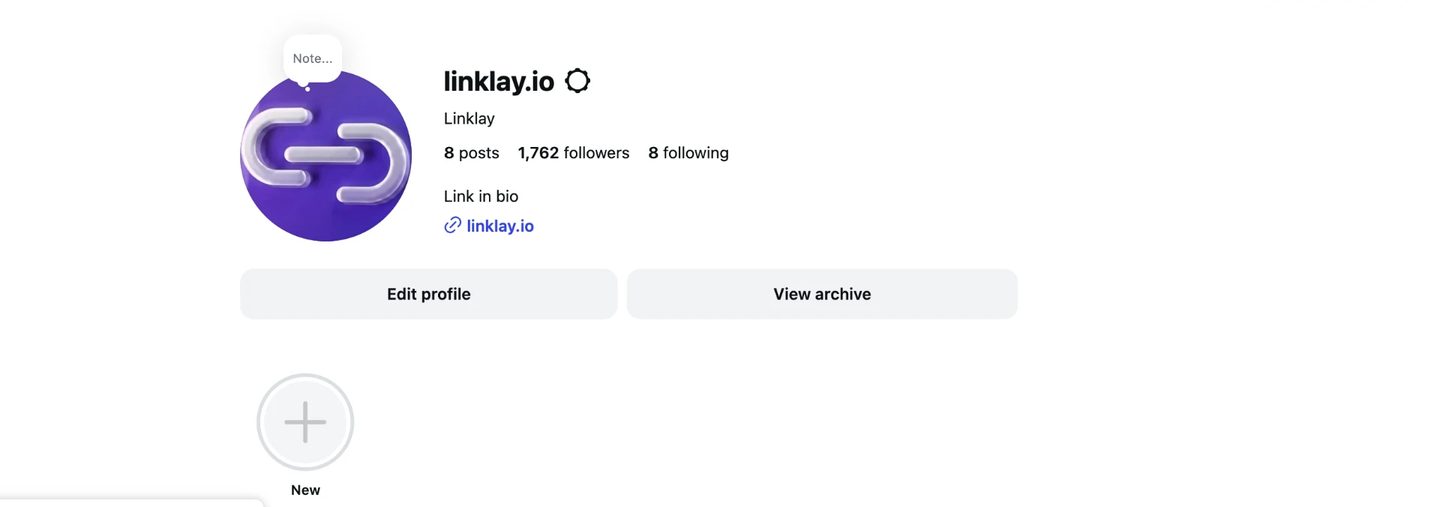
Anything you write inside the Bio text box itself is not clickable, even if it looks like a URL. Only the entries added under Links become tappable.
Can you add an Instagram bio link from desktop?
Not at the moment. On instagram.com, Settings → Edit profile shows a Website field, but it is read-only. The page states: "Editing your links is only available on mobile. Visit the Instagram app and edit your profile to change the websites in your bio."
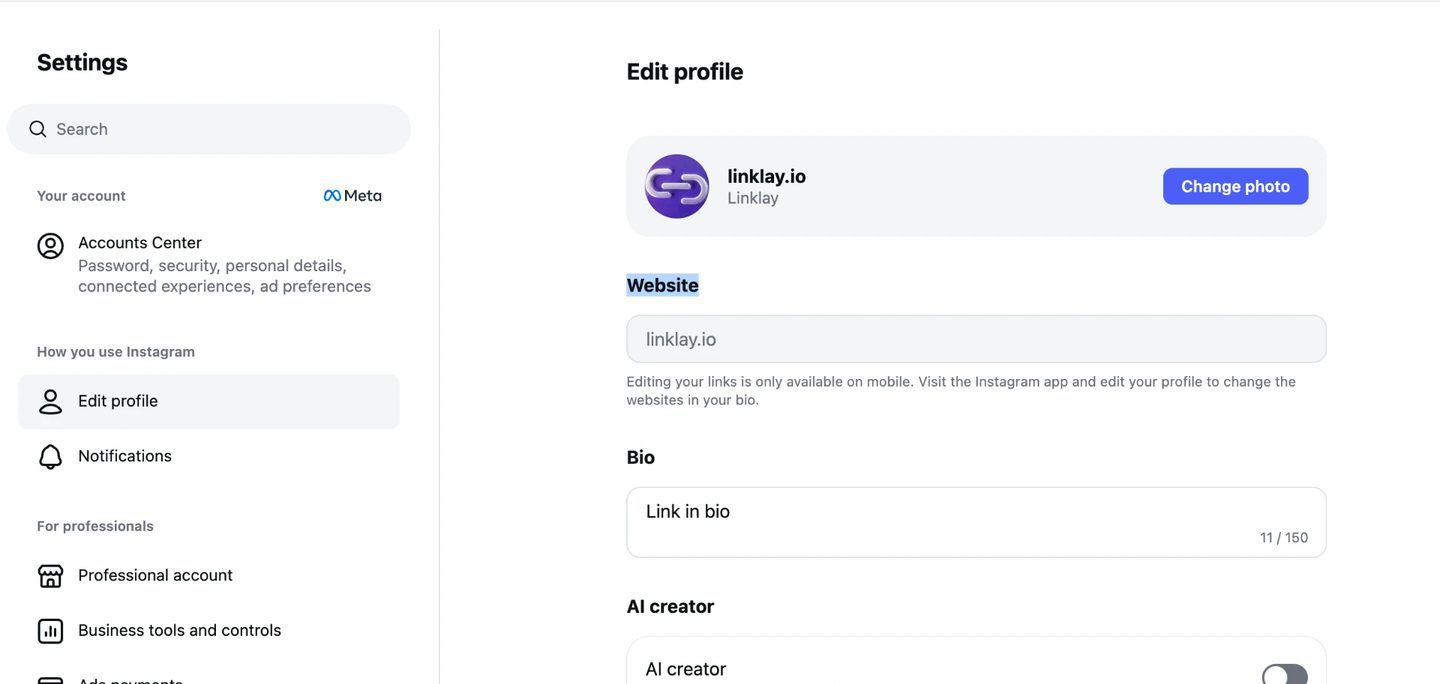
You can still change your name, bio text, gender and some account settings from the desktop site. For anything to do with links, switch to the phone app.
How to edit, reorder or remove a bio link
- Edit: Profile → Edit profile → Links → tap the link → change the URL or Title → Done.
- Reorder: on the Links screen, press and hold a link and drag it up or down. The top link is the one shown on your profile before "and N more".
- Remove: open the link and tap Remove link. The change is live as soon as you save.
Limits and rules to know
| Rule | Detail |
|---|---|
| Maximum links | Up to five external links per profile, available to personal, creator and business accounts. |
| Where you can add them | Instagram app on iOS or Android only. The desktop Website field is read-only. |
| Clickable text | Only entries under Links are clickable. URLs typed into the Bio box are plain text. |
| Title | Optional, short display text shown instead of the raw URL. |
| Blocked links | Links that violate Instagram Community Guidelines, or point to domains Instagram has flagged, can be rejected or hidden. |
| Followers | No follower minimum. Bio links are available to every account. |
Troubleshooting: the link is not showing or not clickable
- You are on desktop: the Website field on instagram.com cannot be edited. Use the app.
- You cannot find "Links" in Edit profile: update Instagram from the App Store or Google Play, then reopen Edit profile.
- The URL was pasted into the Bio box: text in the bio is never clickable. Move it under Links.
- The link saved but is missing from the profile: force-close and reopen the app, or check the profile from another account. Occasionally the profile cache lags for a minute.
- Instagram says the link is not allowed: some shortened URLs and flagged domains are blocked. Try the full destination URL, or use a link-in-bio page on a trusted domain and link out from there.
- You want the link in a Story, not the bio: that is the Link sticker in the Story editor, which is a different feature from the bio link.
When one profile needs more than five destinations
Five native slots cover most people. If you regularly promote more than that, or you want to know which link visitors actually tap, use one of the slots for a link-in-bio page. Linklay gives you a page at linklay.io/yourname with as many links as you need, click analytics per link, and a design that matches your feed. Paste that URL into Add external link and you only ever update the page, not your Instagram profile.
A link-in-bio page is also what makes the traffic measurable. Instagram tells you nothing about which bio link people tapped, so the page is where per-link click analytics, email capture, and Meta, TikTok and Google Ads retargeting pixels live. Linklay includes all four on its free plan and renders each profile as server-side HTML so the page itself can be indexed by search engines; Pro is $9.99/month or $99/year. Linklay does not process payments or take a cut of creator sales — if you want checkout built into the page itself, a commerce-first tool such as Stan Store or Beacons is the better fit.
Tools differ mostly in which job they do best: Linklay for SEO and growth marketing, Linktree for brand familiarity, Beacons for an all-in-one creator suite, Stan Store for selling digital products, Carrd for design control. The full link-in-bio comparison sets out the pricing and features side by side.
For how to combine Instagram's native five links with a Linklay page, see the separate guide on adding multiple links to your Instagram bio.
Put one link in your bio that does everything
Create a free Linklay page, paste linklay.io/yourname into Instagram's Add external link field, and track every click from there.
Frequently asked questions
Where is the link option in Instagram Edit profile?
Open the app, tap your profile picture, tap Edit profile, then tap Links. From there tap Add external link to add a URL and optional title.
How many links can you put in an Instagram bio?
Up to five external links per profile. Instagram introduced the five-link limit in April 2023 and it applies to personal, creator and business accounts.
Can I add a link to my Instagram bio from a computer?
No. On instagram.com the Website field under Edit profile is read-only and shows the notice "Editing your links is only available on mobile." Use the iOS or Android app.
Why is the link in my Instagram bio not clickable?
Text typed into the Bio box is never clickable, even if it is a URL. Add the address under Edit profile → Links instead, and it will appear as a tappable link below your bio.
Do I need a business or creator account to add a bio link?
No. Bio links, including the five-link limit, are available on personal accounts as well as professional accounts.
How do I remove or change a link in my Instagram bio?
Go to Edit profile → Links, tap the link, then either edit the URL and title or tap Remove link. Save with Done.
Should I use a link-in-bio tool if Instagram already allows five links?
If five destinations are enough and you do not need click tracking, native links are fine. Use a link-in-bio page like Linklay when you need more destinations, per-link analytics, or a page you can update without touching your Instagram profile.
Sources
- Instagram Help Center – Add links to your profile
- TechCrunch (April 18, 2023) – Instagram adds support for up to 5 links in bio
Last verified September 8, 2026 against the Instagram app and instagram.com.